
Overview
The strategy at a glance
The ICB Monday Killer is a MetaTrader 5 Expert Advisor that trades one idea, the same way every week. Monday builds the range. Tuesday and Wednesday raid one side of it and deliver price to the other. The EA marks Monday's high, low and midpoint, waits for price to run beyond one side, then sells (or buys) the first confirmed inversion fair value gap, targeting the opposite side of Monday's range.
- Trading days
- Tuesday and Wednesday only (New York time)
- Reference range
- Previous Monday: Sunday 20:00 to Monday 18:00 NY. High, low and midpoint
- Bias
- Raid of the Monday high = sells. Raid of the Monday low = buys. Both raided = stand aside for the day
- Entry model
- Inversion fair value gap (iFVG): a candle closes through an opposing FVG
- Sessions
- Window 1 (London) 02:30–05:00 and Window 2 (New York) 08:30–12:00, each adjustable
- Stop loss
- Beyond the FVG's third candle, plus the spread
- Targets
- Trade 1 takes profit at the opposite Monday extreme. Trade 2 is a runner with no take-profit
- Protection
- Breakeven at 50% to target, breakeven on a Monday-midpoint touch, runner locked at +1R when Trade 1 pays
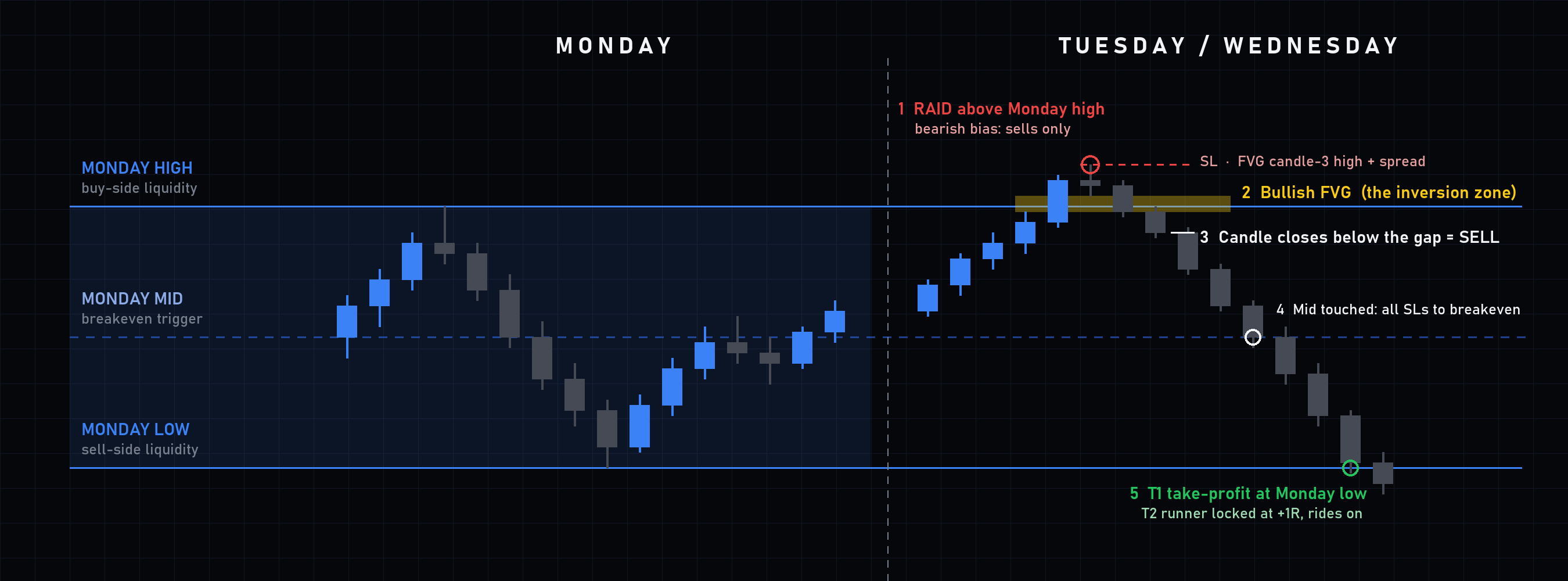
Monday's high and low hold the week's resting liquidity: buy stops above, sell stops below. When Tuesday or Wednesday runs one side, the EA treats it as a Judas swing (a deliberate false move) and positions for the delivery to the other side.
Step 01
Lock the Monday range
On the first tick of a Tuesday or Wednesday, the EA measures the previous Monday trading session: from Sunday 20:00 to Monday 18:00, New York time, using 15-minute candles. Three levels come out of it and stay fixed for both days:
- Monday High — the highest price of the session. Buy-side liquidity rests above it.
- Monday Low — the lowest price of the session. Sell-side liquidity rests below it.
- Monday Midpoint — the exact halfway point. It is not an entry level; the EA uses it to protect open trades (Step 06).
Wednesday uses the same Monday range as Tuesday. The EA never trades Monday itself, and it ignores Thursday and Friday entirely.
Step 02
Wait for the raid
A raid is the bias trigger. It fires the moment price trades beyond a Monday extreme. The first side taken sets the direction the EA is allowed to trade.
| Price action | Bias | What the EA does |
|---|---|---|
| Bid trades above the Monday High | Bearish | Hunts for sell setups only, targeting the Monday Low |
| Ask trades below the Monday Low | Bullish | Hunts for buy setups only, targeting the Monday High |
| Both sides raided on the same day | None | Suspended. No new entries for the rest of that day |
| Neither side raided | None | Stays flat. No raid, no trade |
If price runs above the high and below the low in one session, the range has been fully expanded and there is no clean draw left. The EA stops rather than guess.
Raid status resets every trading day, so Wednesday is judged on its own. If price is already beyond a Monday extreme when Wednesday begins, that counts as Wednesday's raid straight away.
Step 03
Trade only inside the windows
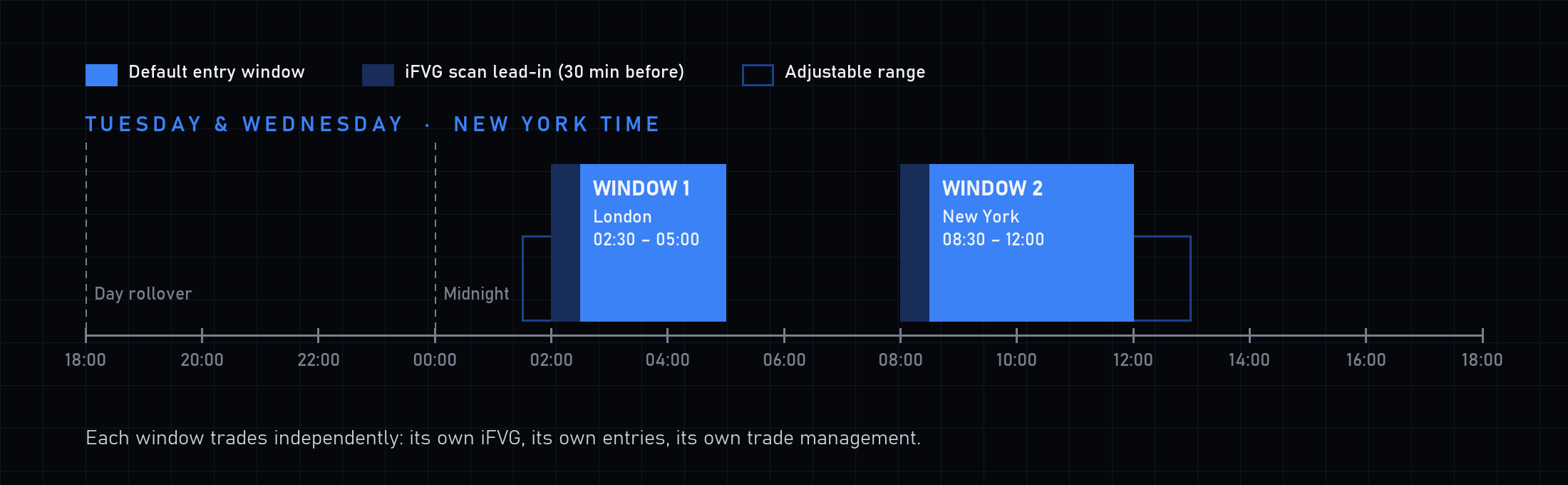
Entries are restricted to two killzones. Each window runs as its own independent trader: it finds its own iFVG, takes its own entries and manages its own positions. Either can be switched off.
| Window | Default | Start options | End options |
|---|---|---|---|
| Window 1 · London | 02:30 – 05:00 | 01:30 · 02:00 · 02:30 · 03:00 | 04:00 · 04:30 · 05:00 |
| Window 2 · New York | 08:30 – 12:00 | 08:30 · 09:30 | 11:00 · 12:00 · 13:00 |
Each window starts scanning for FVGs 30 minutes before it opens, so a gap that forms just ahead of the window can still be traded once the window is live. Orders are only ever placed inside the window itself. If a window closes without an entry, it is finished for the day.
Step 04
Enter on the inversion fair value gap
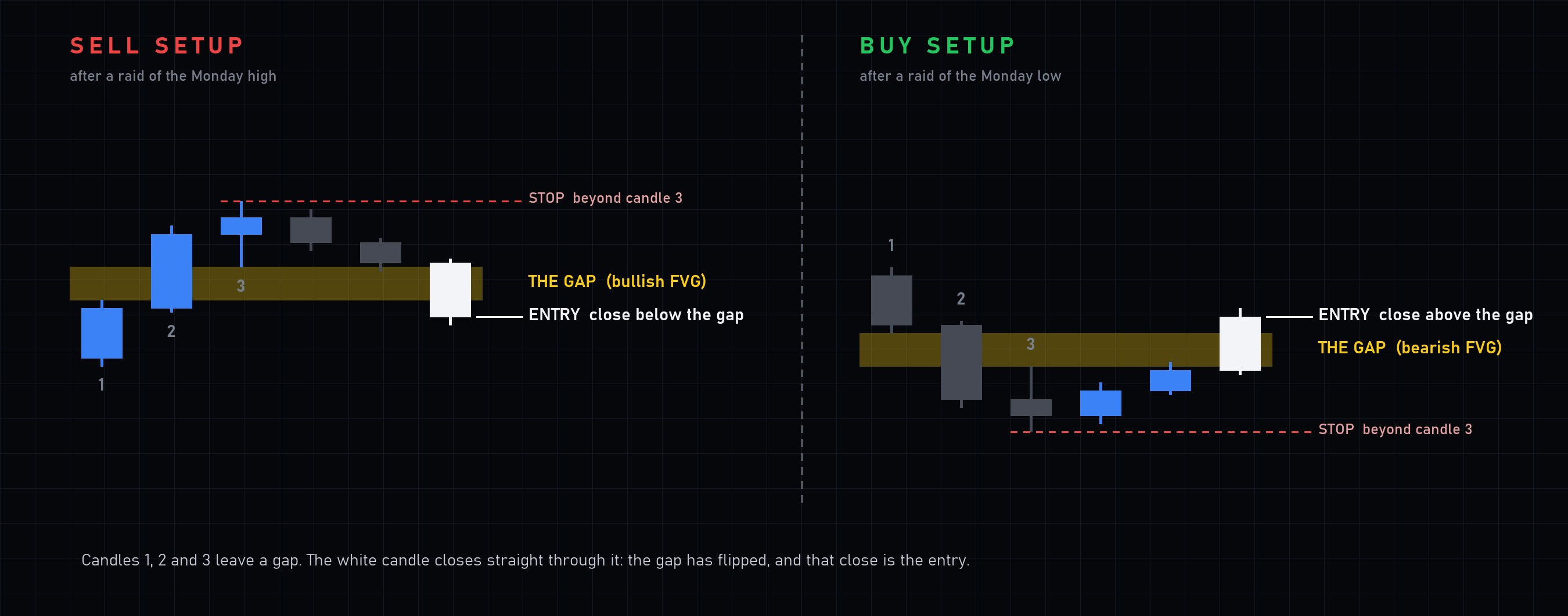
A fair value gap (FVG) is a three-candle imbalance: the wicks of candle 1 and candle 3 fail to overlap, leaving a gap around candle 2. An inversion happens when price later closes straight through that gap against its original direction. Support that fails becomes resistance, and resistance that fails becomes support. That flip is the entry.
Sell setup (after a raid of the Monday high)
- Find a bullish FVG: candle 2 closes up, and candle 1's high sits below candle 3's low. The gap runs from candle 1's high up to candle 3's low.
- Wait for a candle to close below the bottom of the gap. The bullish gap has now inverted.
- Sell at market. Stop loss = candle 3's high plus the current spread.
Buy setup (after a raid of the Monday low)
- Find a bearish FVG: candle 2 closes down, and candle 1's low sits above candle 3's high. The gap runs from candle 3's high up to candle 1's low.
- Wait for a candle to close above the top of the gap.
- Buy at market. Stop loss = candle 3's low minus the current spread.
FVGs are read from the chart timeframe the EA is attached to, using closed candles only. The EA searches from the most recent candle back to the start of the scan period and uses the newest qualifying gap.
An entry is skipped if the take-profit level is already behind price. A buy needs the Monday High above entry, and a sell needs the Monday Low below it.
Step 05
Two trades per entry
Every confirmed signal opens up to two positions at the same price and the same stop. Together they count as one entry.
| Position | Take-profit | Role |
|---|---|---|
| Trade 1 | Opposite Monday extreme (Low for sells, High for buys) | Banks the core move: the delivery from one side of the range to the other |
| Trade 2 | None (runner) | Rides any expansion beyond the Monday range once Trade 1 has paid |
Position sizing
Each trade is sized independently with three inputs:
- Lot Size — a fixed volume, used when neither dollar input is set.
- Desired Risk $ — sizes the trade so that hitting the stop loses this amount.
- Desired Profit $ — sizes the trade so that hitting the take-profit makes this amount (Trade 1 only, since Trade 2 has no take-profit).
When both dollar inputs are set, the EA uses the smaller of the two volumes. Every result is rounded down to the broker's volume step and kept within the symbol's minimum and maximum lot.
Step 06
Protect the position
Three independent rules move stops in the trader's favour. A stop is never moved backwards.
| Trigger | Action | Applies to |
|---|---|---|
| Price reaches 50% of the distance from entry to the opposite Monday extreme | Stop loss moves to entry ± spread (breakeven) | Each trade individually |
| Price touches the Monday Midpoint | Every open stop moves to breakeven + spread | All open trades in that window, once |
| Trade 1 hits its take-profit | Trade 2's stop locks in at entry + 1R (one full risk unit of profit) | The runner |
R is the distance between entry and the original stop loss. If a sell is entered at 100 with a stop at 110, then 1R = 10 points, and the runner's stop is locked at 90. Once Trade 1 pays, the runner can no longer finish as anything worse than a one-R win.
Step 07
Entries and re-entries
Total iFVG entries per window (default 1) caps how many signals each window can take. With the default, a window trades once and is done. When the cap is above 1:
- The window never stacks trades. It waits until all of its positions are closed.
- It then clears the old gap and looks for a fresh iFVG in the same direction.
- When the cap is reached, the window is finished for the day.
Window 1 and Window 2 count separately, so with the default settings the EA can take at most one London entry and one New York entry per day.
Walkthrough
A complete trade, start to finish
A bearish Tuesday on the default settings, following Figure 1:
- Tuesday 00:00 NY. The EA locks Monday's range: High, Low and Midpoint.
- Raid. Price rallies through the Monday High. Bearish bias is set and sells only.
- Gap. On the rally, a bullish FVG prints just above the old high.
- Inversion. Inside Window 2, a candle closes below the bottom of that gap. The EA sells Trade 1 and Trade 2 at market, with the stop above the FVG's third candle plus spread.
- Halfway. Price falls 50% of the way to the Monday Low, and both stops move to breakeven. If price touches the Midpoint first, that does the same job.
- Target. Price reaches the Monday Low. Trade 1 closes in profit and the runner's stop locks at +1R.
- Runner. Trade 2 either extends below the range or is stopped at +1R. The window has used its one entry and is done for the day.
Pre-flight checklist
What the EA checks before it trades
Configuration
EA settings reference
All times are New York local time. Set NY UTC Offset to the difference between your broker's server clock and New York. For example, a server on UTC+2 against New York on UTC−4 (summer) is 6 hours.
| Setting | Default | What it controls |
|---|---|---|
| Magic Number | 777703 | Tags the EA's orders so it only manages its own positions |
| NY UTC Offset (Hours) | 4.0 | Hours the broker server clock runs ahead of New York |
| Password | — | Licence key supplied by Nani Capital. The EA will not start without it |
| Window 1 | On | Enables the London window |
| Window 1 Start / End | 02:30 / 05:00 | London entry window |
| Window 2 | On | Enables the New York window |
| Window 2 Start / End | 08:30 / 12:00 | New York entry window |
| Trade 1 — Enable | On | Opens the take-profit trade at the opposite Monday extreme |
| Trade 1 — Lot / Risk $ / Profit $ | 0.10 / 0 / 0 | Sizing for Trade 1 (see Step 05) |
| Trade 2 — Enable | On | Opens the no-take-profit runner |
| Trade 2 — Lot / Risk $ / Profit $ | 0.10 / 0 / 0 | Sizing for Trade 2 |
| Move SL to BE at % of TP | 50 | How far toward the target price must travel before breakeven |
| Total iFVG entries per window | 1 | Maximum entries each window may take per day |
Back-test on your own broker's data in the MT5 Strategy Tester using Every tick based on real ticks, and confirm in the journal that the locked Monday High and Low match your chart.
Run on a demo account until the EA's behaviour matches this document, then size risk so that a losing week is comfortable.
Take it offline
Keep the breakdown by your terminal.
The full EA logic, figures and settings reference in one file.
RISK DISCLOSURE Trading leveraged products carries a high level of risk and may not be suitable for every investor. This document describes how an automated strategy behaves. It is not financial advice and not a guarantee of results. Past and back-tested performance does not indicate future returns. Only trade with capital you can afford to lose.